Repair Case · 2026-10-14 · ComputerKing HK
White Full-Tower Case Repair Diary: All-White Build + AIO Cooler + RTX — A New Journey Continues
White full-tower case repair diary: GIGABYTE RTX white card, NZXT AIO cooler showing 32 degrees, all-white theme. Servicing a large case means care with the glass panel, coolant tubes, heavy GPU support, and static. Power-on test normal — a new journey continues.
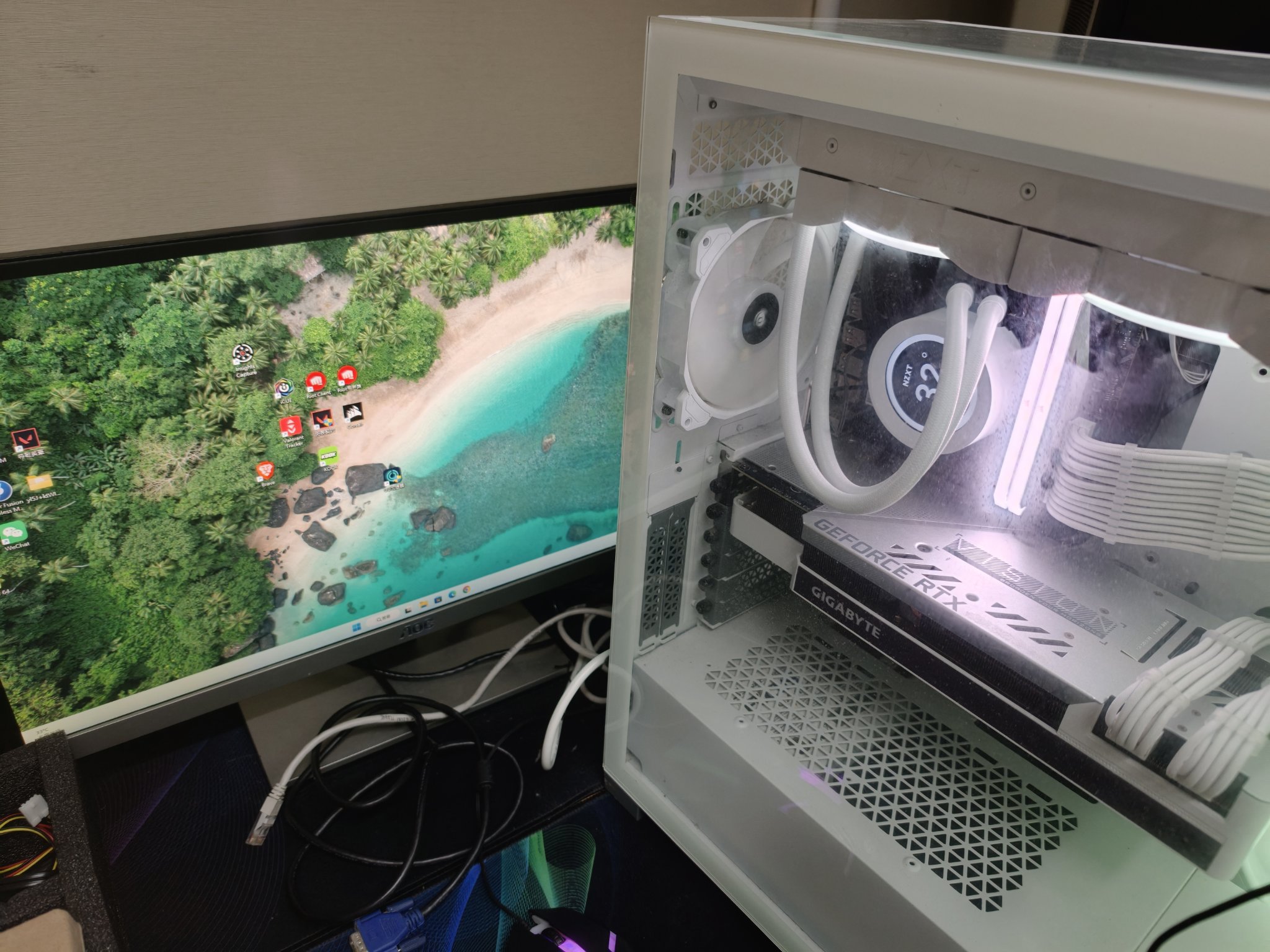
This Machine: White Full-Tower Case, All-White Theme
This machine is a white full-tower case with a tempered glass side panel and an all-white interior: white fans, white sleeved cables, and a white graphics card. After powering on, the NZXT all-in-one liquid cooler head's LCD shows 32 degrees, and the Windows desktop displays normally, confirming the machine is running properly.
Hardware Visible in the Photos
Graphics card: A white GIGABYTE GeForce RTX card, mounted horizontally, occupying most of the lower half of the case. With cards this large, check that the power cables are firmly connected and that the case provides enough support to prevent long-term sagging from stressing the PCIe slot.
Liquid cooler: An NZXT all-in-one liquid cooler with an LCD temperature display on the pump head. The photo shows 32 degrees, which is within the normal idle temperature range. The coolant tubes are routed neatly without excessive bending.
Motherboard: A GIGABYTE motherboard. During the repair process, the motherboard was removed from the case and then reinstalled. When handling large motherboards like this, take care not to touch the pins, and tighten the screws in a diagonal sequence.
Fans and cable management: Multiple white case fans, with white braided cable sleeving, tidily organised. Neat cable management is not just about looks — it keeps airflow paths clear, which matters for cooling.
What to Watch When Servicing a Large Case
First, size and weight. A full-tower case is bigger and heavier than a standard case. Moving and disassembling it should be done with two people, or on a sturdy workbench, to avoid dropping it and damaging people or hardware.
Second, the glass side panel. These cases usually use tempered glass side panels. When removing the panel, place it on a soft pad, never directly on a hard floor. When reinstalling, do not overtighten the screws — uneven stress can crack the glass.
Third, coolant tubes. When disassembling an all-in-one liquid cooler, never pull hard on the tubes. The tube fittings are the most vulnerable part; excessive bending can cause leaks. When reinstalling the pump head, ensure the mounting pressure is even and the thermal paste is applied thinly and evenly.
Fourth, the large graphics card. These large RTX cards are long and heavy. To remove one, disconnect the power cables first, release the rear retention clip, and lift it out slowly with both hands supporting it. When reinstalling, listen for the click confirming it is fully seated in the PCIe slot.
Fifth, static electricity. Before handling any hardware, touch the metal part of the case to discharge static, or wear an anti-static wrist strap. Motherboards, RAM, and graphics cards are all sensitive to static discharge.
Daily Care for a White Build
Dust: White cases show dust more than any other colour. Accumulated dust not only looks bad, it hurts cooling. Clean every three to six months: blow dust out from inside to outside with compressed air, and gently wipe fan blades with a soft cloth.
Temperature: Check the cooler display and system temperatures regularly. Idle around 30–40 degrees is normal; 70–85 degrees under gaming load is acceptable. If idle temperatures climb above 50 degrees, check whether the cooler has an issue or the thermal paste has dried out.
Cables: Do not fiddle with the cables inside the case yourself, especially the coolant tubes and graphics card power cables. If you find a loose cable or hear an unusual sound, power off before inspecting — never poke around inside while the machine is running.
A New Journey Continues
After this white full-tower case repair was completed, the power-on test was normal: the cooler showed 32 degrees and the Windows desktop ran smoothly. The machine is ready to continue serving. A carefully built all-white machine like this deserves proper maintenance and regular checks so it can run for years to come.
If your machine is a similar large case, white-themed, liquid-cooled build with a large graphics card, and you run into any problem — won't power on, abnormal temperatures, noise, crashes — bring it in for a check. We are at Room 9, 12/F, Darley Plaza, On Lai Street, Shek Mun, Sha Tin. WhatsApp 2115 9219.
Frequently Asked Questions
Do white cases accumulate dust more easily?
White shows dust more than any other colour. Clean every three to six months with compressed air blown from inside to outside, and gently wipe fan blades with a soft cloth. Accumulated dust hurts cooling.
Is 32 degrees on the liquid cooler normal?
Yes. Idle temperatures of 30–40 degrees are normal. If idle climbs above 50 degrees, check whether the cooler has an issue or the thermal paste has dried out.
How do I prevent a heavy graphics card from sagging?
Make sure the power cables are firmly connected, and use the GPU support bracket or post that came with the case. Long-term sagging stresses the PCIe slot and can cause poor contact.
How should I handle a glass side panel when removing it?
Place it on a soft pad, never directly on a hard floor. When reinstalling, do not overtighten the screws — uneven stress can crack the glass.